
Tips & Tricks
Update…
You can forget all the scripts and typing commands in a terminal window. Starting with HamClock V4.24 you can do the upgrade and the backend server switch in one simple step..
To update to V4.24 just do the following:
Stop HamClock with the lock menu
Connect a monitor and a keyboard to your Quadra
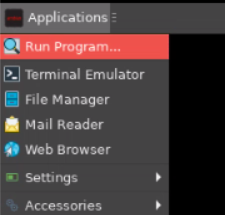
Go to “Applications” and select “Run Program…”
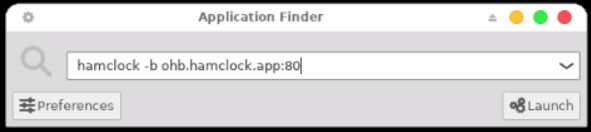
Type the following command:
hamclock -b ohb/hamclock.app:80Click on “Launch”
If you see the offer for the upgrade, accept it.
Reboot !
HamClock will update and is now on OHB ready for future updates.
If you use a Quadra4k paired with a 4k monitor you also need to update the 4k resolution executable. with:
hamclock-4k -b ohb/hamclock.app:80watch for the spaces. “hamclock-4k” but there are spaces around “-b” and at the end there is a “:” and not a “;”.
do the upgrade as well here.
Reboot !
You can now update your factory recovery card to V4.29 in your device if your card is on HamClock V4.16 or later. Instructions can be found on my downloads page.